
IBO Pro Player — listed by its developer as Ibo Player Pro — is a media player. It plays the IPTV playlist your provider gives you and contains no channels of its own. This guide covers where to get the app, how to attach your IPTV Canada Neo playlist through the developer’s website, and how activation works.
Not sure which device to run it on? See our IPTV box guide for Canada for a comparison of sticks, Formuler, MAG and Google TV boxes. And if you are still weighing up which app to use, our guide to the best IPTV apps in Canada shows how IBO Pro Player compares with the alternatives.
What IBO Pro Player is (and what it isn’t)
IBO Pro Player loads an M3U playlist from your provider and plays its live channels, films and series. The developer describes it as a general media player and says plainly that it does not sell or offer any content. You bring the playlist; the app plays it.
It has no programme guide of its own. According to the developer’s FAQ, TV guide information appears only when your provider’s playlist supplies EPG data.
Where to get IBO Pro Player
Start from the developer’s official site, iboproapp.com, which links to the current version for each platform:
- Android TV, Android boxes and Amazon Fire TV: the developer publishes an Android download on its site, with a Downloader code for Fire TV.
- Samsung and LG smart TVs: install it from the TV’s app store; the developer’s site links to both listings.
- iPhone, iPad and Apple TV: the App Store listing is called ibo Pro Player — see our iPhone and iPad guide.
- Windows: the Microsoft Store listing is called Ibo Player Pro — see our Windows PC guide.
- ZEASN and Whale OS TVs: the developer lists these as supported too.
Several unrelated apps in the app stores use almost the same name. Before you install or pay, check that the listing links back to iboproapp.com.
How to add your playlist
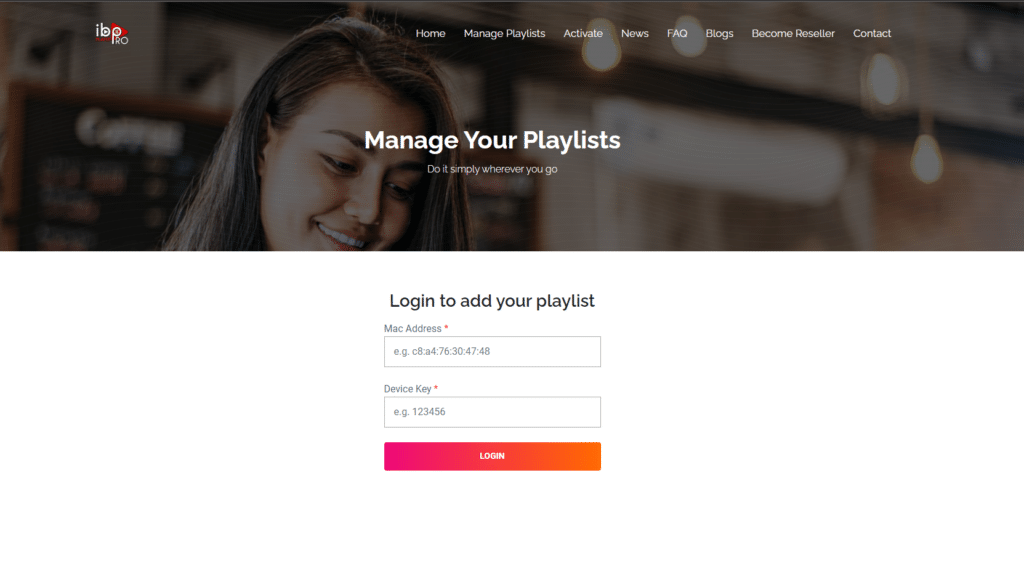
You don’t type the playlist into the app with the remote. You attach it on the developer’s website, using two codes the app shows you.

- Open IBO Pro Player on your TV or device and note the MAC address and device key on the start screen.
- On a phone or computer, go to iboproapp.com/manage-playlists/login, enter the MAC address and device key, and click Login. You can also scan the QR code on the app’s start screen.
- You are taken to your playlists page. Click Add.
- Give the playlist a name, paste the M3U link from your IPTV Canada Neo welcome email, and save.
- Go back to the app, close it completely and open it again.
- Let the playlist load, press Continue, open the channel section and test a channel.
Activation and price
IBO Pro Player has to be activated on each device to keep using it after any trial the developer offers; the start screen shows how much trial time is left. The price depends on the platform. On the Canadian App Store, the iPhone and iPad listing shows an Activation in-app purchase at $12.99. Store prices can change, so check the listing before you pay.
The developer asks people not to buy activation unless they already have a playlist to use. Activation does not include any content, and its FAQ says payments are not refunded when the app is bought without a list.
Activating through the website
- Go to iboproapp.com/manage-playlists/login and log in with your MAC address and device key.
- After logging in, open the activation section and follow the payment steps shown there.
- When you have finished, close and reopen the app so the activation takes effect.
If the playlist doesn’t load
- The app is slow or seems frozen at start-up: it downloads your playlist from the provider’s server each time it opens, so a large list on a slow connection takes a while. Give it a minute, then check your internet connection.
- The playlist works on your computer but not on the TV: the developer points out that smart TV models differ in the stream formats they can play. If the computer is on a different network, the network can also be the difference.
- There is no TV guide: IBO Pro Player shows programme information only when the playlist supplies EPG data.
- Channels play but buffer: work through our stream performance guide.
IBO Player (classic) on Samsung and LG Smart TVs
IBO Player is a separate app from a different developer (iboplayer.com), and it is still found on Samsung and LG TVs. It works the same way in principle: the app contains no channels, you add your playlist through the developer’s website, and you activate it after the trial.
How to set up IBO Player on a Samsung or LG TV
- Install IBO Player from your TV’s app store and open it. Note the MAC address and device key shown on screen.
- On a phone or computer, go to iboplayer.com/device/login and sign in with that MAC address and key.
- Add your playlist using the M3U link from your IPTV Canada Neo email, and give it a name.
- Back on the TV, close and reopen IBO Player. The playlist loads under the name you gave it.
The developer’s site describes a 7-day trial for testing; after that, the app has to be activated to keep using it. If you would rather avoid that step, IBO Pro Player above and the free players in our setup tutorials are good alternatives.
FAQ
Does IBO Pro Player come with channels?
No. The developer states that it does not sell or supply any channels, films or series. The app plays the playlist from your IPTV provider — with IPTV Canada Neo, that is the M3U link in your welcome email.
Where do I add my playlist?
On the developer’s website, not in the app itself. Log in at iboproapp.com with the MAC address and device key shown on the app’s start screen, add your M3U link, then close and reopen the app.
How much does IBO Pro Player cost?
The app is free to install and then needs a paid activation for each device. The price depends on where you buy it: the Canadian App Store lists the iPhone and iPad activation at $12.99. Check the listing for your platform before you pay, because store prices can change.
Can I use IBO Pro Player on an iPhone or a Windows PC?
Yes. The same developer publishes it in the App Store (as ibo Pro Player) and in the Microsoft Store (as Ibo Player Pro). Our iPhone, iPad and Apple TV guide and our Windows PC guide walk through those setups.
Is IPTV legal in Canada?
IPTV is a delivery method, and the same technology carries Bell Fibe TV, Rogers Ignite TV and Telus Optik TV. What Canadian law cares about is not how a picture reaches your screen but whether the programs being sent were cleared with the people who own them — so the question attaches to a service and its content, not to the technology or to a player app such as IBO Pro Player. Our guide to IPTV and Canadian law goes through what the Copyright Act actually says.